Kinder Kids: A Playful Typeface for Whimsical Designs
Understanding the Personality of This Display Font
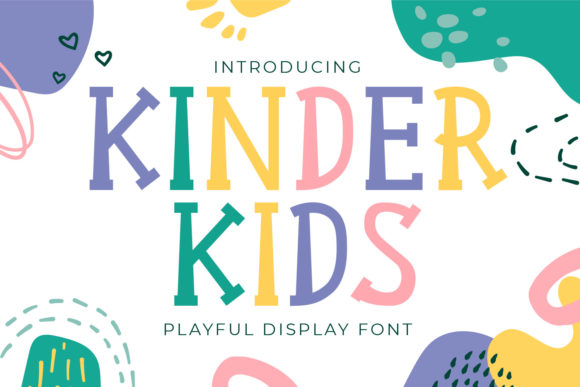
When you're working on a project that needs to feel approachable, lighthearted, and genuinely fun, the typography choices you make carry significant weight. Kinder Kids is a premium font that steps into this space with a clear identity. It's a display font with rounded letterforms, soft edges, and a slightly bouncy baseline that gives it an unmistakably cheerful personality. Think of the lettering you'd see on a toy store sign, a children's book cover, or the packaging for a snack brand targeting families.
What makes this typeface stand out isn't just its cuteness. The designer paid attention to proportion and spacing, which means the characters feel balanced even though they're clearly playful. The strokes have a consistent weight that keeps things readable at larger sizes, and there's enough variation between individual letters to avoid that cookie-cutter look some display fonts suffer from. Each character carries its own little quirks while still feeling part of a cohesive family.
Compared to a typical sans serif font or serif font you might use for body text, Kinder Kids occupies a very different role. This isn't a workhorse for paragraphs. It's a creative font designed for headlines, logos, packaging callouts, and anywhere you want to inject personality in a single glance. If you've ever struggled to find a typeface that feels warm without being childish or playful without being unprofessional, this one threads that needle well.
Where Kinder Kids Shines Across Projects
The practical applications for a font like this are broader than you might initially assume. Yes, it works beautifully for children's games, cartoon-related designs, and educational materials. But its appeal extends well beyond that obvious territory.
For brand identity work, Kinder Kids can anchor the visual language of a bakery, a daycare center, a family-oriented blog, or a pet grooming business. Entrepreneurs launching products aimed at parents or young families often need typography that signals warmth and trustworthiness without looking generic. This display font accomplishes that without requiring a custom lettering commission.
In packaging design, it performs exceptionally well on product labels, box art, and retail signage. The letterforms hold up at various sizes, which matters when you're designing something that needs to read clearly on a shelf from several feet away. Pair it with a clean sans serif font for supporting text, and you have a visual hierarchy that guides the eye naturally.
For social media graphics, Kinder Kids brings instant character to Instagram posts, YouTube thumbnails, and Pinterest pins. Content creators and bloggers who cover parenting, crafts, recipes, or lifestyle topics will find it particularly useful for creating quote graphics, announcement posts, and promotional materials that stop the scroll.
Publishers working on editorial design projects like magazine feature headers, book chapter titles, or newsletter mastheads can use it to set a friendly, inviting tone. It also works well in web design for hero sections, call-to-action buttons, and landing page headlines where you want to make an emotional impression quickly.
Working With Kinder Kids in Your Design Process
Before committing any creative font to a project, it's worth spending time evaluating fit. Start by asking whether the font's personality aligns with the message you're communicating. Kinder Kids conveys joy, approachability, and playfulness. If your project demands authority, luxury, or minimalism, you'll want to look elsewhere. But if the brief calls for warmth and character, you're in the right territory.
One practical step many designers skip is testing the font at the actual sizes it will appear. Pull up your design software, set a headline in Kinder Kids, and view it at the dimensions it would appear on a printed flyer, a mobile screen, or a product label. Check how the letter spacing feels. Look at how specific letter combinations sit next to each other. Some words will look better than others depending on the characters involved, and this is true of every display font ever created.
Font pairing deserves careful attention here. Kinder Kids works best when it's the star of the show, supported by something more restrained. A geometric sans serif font like Montserrat or Poppins makes a strong companion for body copy. If you want something with a bit more warmth in the secondary typeface, a handwritten font or script font with a lighter personality can complement it without competing. Avoid pairing it with other highly decorative fonts, as that creates visual noise rather than hierarchy.
Review the included styles and character set before purchasing. Does it include numbers, punctuation, and special characters you'll need? Does it support multiple languages if your audience is multilingual? These practical details matter more than the initial excitement of finding a beautiful font.
Readability is another consideration that deserves honest assessment. At small sizes or in long strings of text, any display font will become harder to read. Kinder Kids is no exception. Use it generously sized for maximum impact, and rely on complementary typefaces for smaller text elements. This approach also strengthens your visual hierarchy, making designs easier to navigate.
For commercial use, verify the licensing terms before deploying the font in client work, merchandise, or digital products. Most commercial font licenses cover standard business use, but specific applications like app embedding or large-scale print runs sometimes require extended licenses. Reading the fine print protects both you and your clients.
Ultimately, Kinder Kids is a valuable addition to any designer's toolkit when the project genuinely calls for it. Like any design asset, its effectiveness depends entirely on context. Used thoughtfully, it elevates a design from ordinary to memorable. Used without consideration, even the best font falls flat. Take the time to understand what this typeface brings to the table, test it within your specific project constraints, and let it do what it does best—bring a smile to your audience's face.