Elwin: The Decorative Display Typeface for Unforgettable Impact
When you're working on a project that needs to break through the visual noise, a standard sans serif font or a classic serif font often isn't enough. Some designs demand a typeface that acts less like a tool and more like a centerpiece. Enter Elwin, a premium font crafted specifically for high-impact scenarios. This isn't your everyday text face; it is a decorative display font engineered to be the focal point of your composition. If you are looking for modern typography that combines artistic flair with a polished finish, Elwin offers a distinct visual personality that refuses to blend into the background.
The Visual Character of Elwin
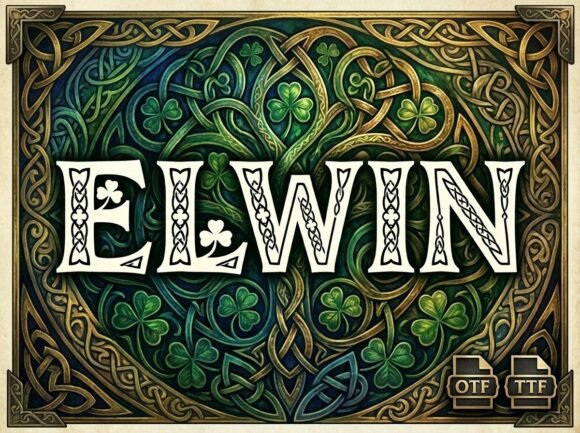
Elwin is defined by its unique artistic elements. It possesses a strong, structural geometry that feels both contemporary and timeless. The letterforms are designed with distinct quirks and flourishes that give the typeface a life of its own. Unlike script fonts or handwritten fonts, which rely on flow and connection, Elwin relies on bold shapes and negative space. It is a creative font that commands attention through its silhouette.
It is crucial to understand the nature of this asset before incorporating it into your workflow. Elwin is an ALL-CAPS display typeface. This means it does not include lowercase letters. This design choice is intentional. It forces a uniformity and presence in headlines that mixed-case fonts often struggle to achieve. Because every letter is treated as a work of art, the font excels in situations where short bursts of text need to carry significant weight. If you are designing a logo, a book cover, or a hero section for a website, this uppercase approach ensures that your message is delivered with maximum authority.
Strategic Applications: Where Elwin Shines
Choosing the right font is about matching the tool to the task. Elwin is versatile, but its strengths lie in specific areas of modern typography. It is built for display purposes, meaning it shines brightest at larger sizes. Trying to use it for body copy or long-form paragraphs would result in readability issues, but when used for headlines, it is incredibly effective.
Branding and Logo Design
For entrepreneurs and small business owners, your logo is the face of your brand. Elwin offers the kind of distinctiveness required for memorable logo design. Its strong visual personality helps businesses stand out in crowded markets. Whether you are launching a boutique agency, a fashion line, or a tech startup, using Elwin for your wordmark can instantly establish a brand identity that feels bold and confident. It pairs exceptionally well with minimal design elements, allowing the typography to do the heavy lifting.
Packaging and Editorial Layouts
In packaging design, shelf appeal is everything. Elwin’s decorative nature makes it ideal for product names, taglines, and headers on labels. It gives physical products a tactile, premium quality. Similarly, in editorial design, such as magazine spreads or book covers, Elwin can be used for chapter titles or pull quotes. It breaks the monotony of standard text layouts and draws the reader's eye to key content, creating a dynamic visual hierarchy.
Digital Presence and Social Media Graphics
The digital landscape moves fast. To stop a user from scrolling, you need visuals that pop. Elwin is a powerful asset for social media graphics, particularly for Instagram stories, Pinterest pins, or YouTube thumbnails. Its uppercase structure ensures legibility even on small mobile screens, provided the text is kept short. For web design, use Elwin for hero headers to set an immediate tone for the user experience, but switch to a more legible sans serif font for the navigation and body text.
Designing with Intention: Pairing and Hierarchy
Using a display font like Elwin requires a thoughtful approach to font pairing. Because Elwin is so expressive, it needs a grounding partner. You generally want to avoid pairing it with other decorative fonts, as this creates visual clutter. Instead, look for a neutral, clean typeface to support it.
- With Sans Serifs: Pairing Elwin with a geometric or clean sans serif font creates a modern, high-contrast look. The simplicity of the sans serif allows Elwin’s artistic details to stand out without competition.
- With Serifs: For a more sophisticated or editorial vibe, try pairing Elwin with a transitional serif. This works well for publishing or high-end branding.
- With Scripts: While riskier, combining Elwin with a subtle script font can work for wedding invitations or feminine branding, provided the script is understated.
When building your layout, focus on visual hierarchy. Use Elwin for the H1 or the primary focal point. Use your secondary font for sub-headers and body copy. This contrast guides the viewer’s eye naturally from the most important element (the headline) to the supporting information.
Practical Considerations for Professionals
Before you download and install Elwin, it is helpful to review the technical specifications included with the package. You will receive both an OTF file (OpenType Font) and a TTF file (TrueType Font).
- The OTF File: This is the professional standard. If you are using advanced design software like Adobe Illustrator, InDesign, or Photoshop, the OTF file is usually the best choice. It often contains more refined spacing and kerning data.
- The TTF File: This format ensures universal compatibility. If you are installing the font on a Windows machine for use in Office products or need to ensure it renders correctly on older systems, the TTF file is your go-to.
Regarding commercial licensing, always verify the terms provided by the creator. Most premium fonts like Elwin come with a license that covers a specific number of users or projects. If you are a design agency or a large publisher, ensure your license covers the scope of your work to avoid legal issues down the line.
Finally, remember the nature of the typeface. Since Elwin is an all-caps display font, readability is best achieved through short, impactful text. Avoid writing sentences in all caps with this font; instead, use it for single words or short phrases. By respecting the font's design intent, you ensure that your brand identity remains professional and polished, rather than chaotic. Elwin is a tool for impact—use it where it counts, and it will elevate your design assets significantly.